Moving from Homelab to Home-Prod!
Moving from Homelab to Home-Prod!
Daniel Benge, Jan 31, 2026
Intro
Homelabs are awesome. Whether you’re self-hosting an adblocker, experimenting with networking, reducing your dependence on cloud services, or just backing up your files, it’s a great, practical way to learn using hardware you already own. The open source community makes a massive difference too; without amazing tools like Immich or Home Assistant it would be very difficult to take control of your own data and manage your digital resources, and I’m so thankful for the developers and contributors who make it possible. Over time my homelab has grown from a fun project to supporting thousands of daily users and millions of API calls per month, and I’ve learned so much in the process!
Starting Out
I began self-hosting when I was about 13, when I was gifted a Raspberry Pi Zero W for Christmas. Limited to just 512MB of RAM and a single USB port, I picked up the basics of SSH and slowly taught myself to move away from relying on a GUI, and within a few months I had set up a headless instance of Pi-Hole for my phone. Sure, it’s pretty much the most recommended Pi project out there, but it meant a lot to see the effects in real time after many hurdles and bugs! Within a year or so I moved on to a Pi model 4B with 4GB of RAM, which allowed me to start experimenting with Docker and hosting my own services on it. It wasn’t the most stable, and SD cards wore out quickly, but it was a nice introduction to networking too as I configured hostapd with my own adblocking DNS.
Outgrowing the Pi
Eventually, RAM became more of an issue, so I investigated my options for hardware. The most common recommendation seemed to be mini-PCs (see project TinyMiniMicro). After some research, I settled on an Elitedesk 800 G3 Mini with 16GB of RAM and a 500GB SATA SSD. This was a huge step up in performance, and I was able to run more services like Immich for photo management, and started to host my personal projects on it too. I bought a domain from Cloudflare (no prizes for guessing what the domain is!) and set up a reverse proxy with Caddy to manage SSL certificates and routing. This setup worked well for a while, but as my projects grew in popularity, I started to run into limitations.
Users!
As my “My Runshaw” app gained traction, I found myself needing to support a rapidly growing user base. What started as a fun college project quickly turned into a service with close to 4,000 of daily users, and I started to reconsider the software I was using. Initially, I had a very basic combination of SQLite, Flask and Appwrite, but this became increasingly difficult to manage as the user base grew. SQLite, while great for small projects, struggled with concurrent access and larger datasets. I began to experience slowdowns and occasional crashes, which was unacceptable for a production service. To address this, I migrated to PostgreSQL for the database, which offered better performance and scalability, and restructured the backend to use FastAPI instead of Flask for improved speed and async support. Moving to a relational database structure was so beneficial that it should really have been the case since the beginning - and Appwrite has continued to work well for authentication, so I kept that in place. XCode Cloud has also been a lifesaver for building and distributing for iOS; having a reliable CI/CD pipeline that doesn’t rely on a pricey and unrepairable Mac helps so much.
Scaling Up
Having a mini-PC is amazing, but sometimes lacking in features when compared to proper servers. I needed power state restoration on power loss, ideally ECC RAM for data integrity, and remote management. Thanks to the generosity of the team at Britannia IT and Birkdale Computers, I was able to acquire a second-hand HPE Microserver Gen8 with 16GB of ECC RAM and a Celeron processor (which I immediately upgraded to a Xeon E3-1265L v2). This was a game-changer, especially with the iLO remote management capabilities, allowing me to manage the server without needing physical access. I considered setting up RAID with 4 drives, but ultimately decided against it due to the power usage and noise levels far exceeding my needs. Instead, I booted from a 2.5" SSD in a 3D printed adapter in the first bay, and used the second bay for a consumer-grade 2TB HDD which I only spin up for backups. I also swapped the stock power supply’s fan for a practically silent Noctua one, making a huge difference to noise levels.
With this new setup, I was able to run more services reliably, and the ECC RAM provided peace of mind for data integrity. However, as my user base continued to grow, I started to encounter some strange issues which led me to rethink my entire architecture. After rebooting one day, I found that some services were running slowly, and after some investigation, I discovered that Redis was crashing due to segmentation faults - this unfortunately lined up perfectly with the beginning of the recent memory shortage and so I needed a quick and reliable way to regain stability without causing downtime. I ran memtest86+ overnight and found nothing, but so many errors with software behaving unexpectedly pointed to faulty RAM, and I simply couldn’t risk database corruption.
Moving to Home-Prod
Hardware
Whilst I don’t plan for this to be the long-term solution, I quickly migrated to a temporary setup using a Dell Inspiron 3470 that had 16GB DDR4 RAM and a reasonable 3.6GHz i3-8100 - sure it’s not server grade, but it’s actually a pretty solid machine with better performance than my Microserver. Whist I had the chance, I added a PCIe to NVMe adapter and a 512GB NVMe SSD for improved performance (the M.2 slot on the motherboard only supports SATA speeds), and an Intel i210 NIC for better stability compared to the onboard Realtek one. For secondary storage, I added a 16TB Seagate Skyhawk AI HDD, which I got factory refurbished. It’s not designed for workloads other than sequential writes, but that doesn’t really matter here where I only spin it up for backups once per day, and it consumes very little power when in standby_z state (essentially a deep sleep, configured with openSeaChest). Dell also shipped it with a nice BIOS for a consumer machine, with options for restoring power state on power loss and disabling pre-boot checks for keyboard etc.
Architecture Overhaul
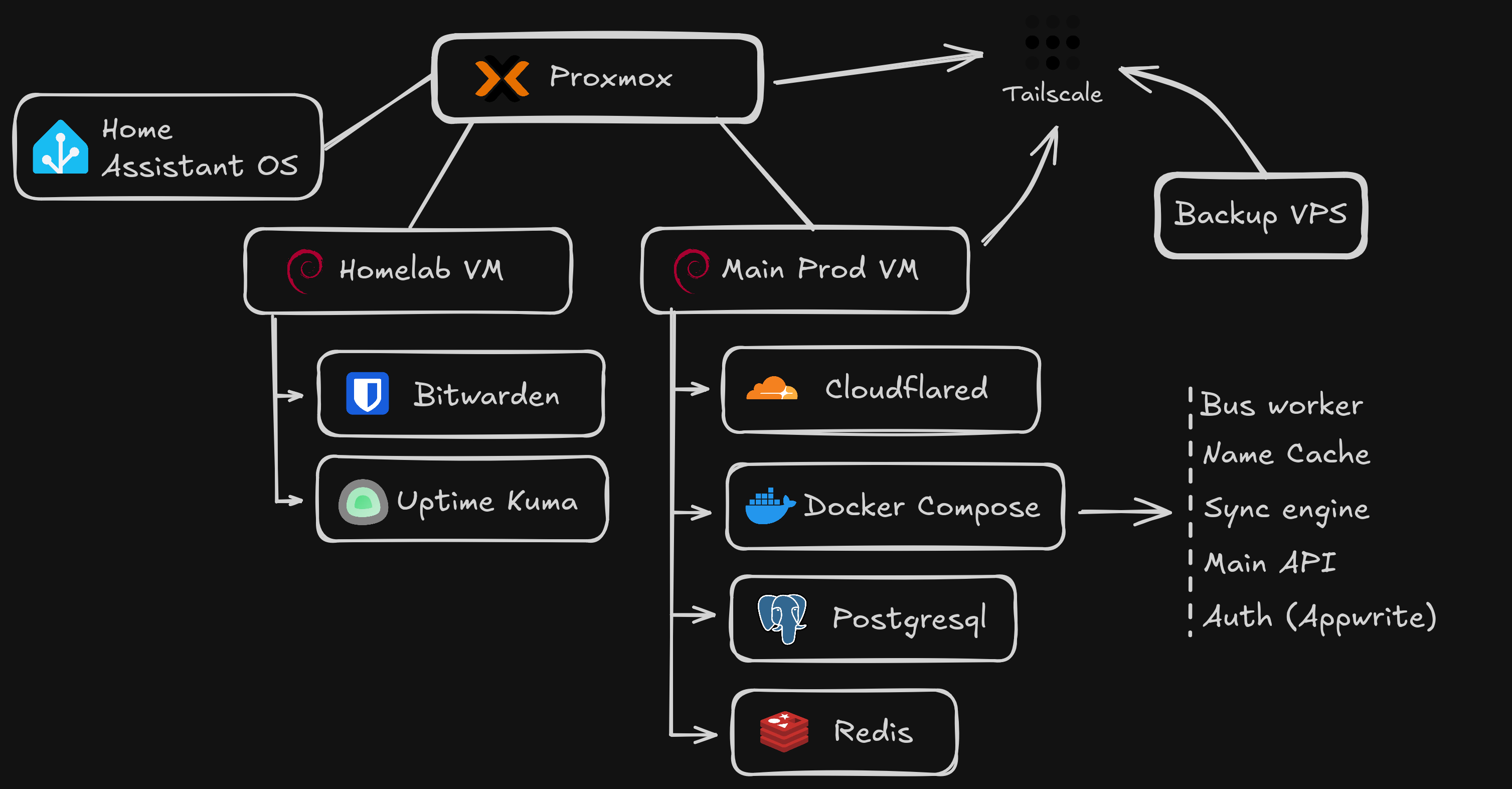
The RAM failure was inconvenient, but it also gave me a great opportunity to rethink my architecture. Sure, bare-metal is great, but as I learned the hard way it doesn’t scale well when you need to change hardware or recover from failures quickly. After researching various options, I decided to move to a virtualized environment using Proxmox VE. I took this chance to finally separate my personal services from more critical ones, and set up two separate VMs: one for my personal projects and another for production services. This way, if something goes wrong with one VM, it doesn’t affect the other. I allocated 8GB of RAM to the main VM and 4GB to my personal one, which has been more than sufficient so far. With daily backups on a separate drive (and eventual offsite backups to a VPS), I feel much more confident about the stability and reliability of my setup. The structure looks something like this:
- “My Runshaw” VM: A dedicated Debian VM for my users. It gets priority RAM & daily snapshots
- “Homelab” VM: Where I run Immich, Bitwarden, and other small experiments. If I break this, my users never notice.
- Home Assistant: Isolated on the host as supervised installation is deprecated and addon support is nice
Conclusion
Moving from a homelab to a more production-oriented setup has been challenging but incredibly interesting and genuinely fun! I’ve learned a ton about hardware, virtualization, and system administration along the way. While I still love tinkering with my homelab projects, I now have a more robust and scalable setup that can handle the demands of a growing user base. If you’re considering making a similar transition, I highly recommend taking the time to plan your architecture carefully and invest in reliable hardware. The peace of mind that comes with knowing your services are stable and secure is well worth the effort